
Smart Thermostats & the Honeywell T4: A Buyer's Guide
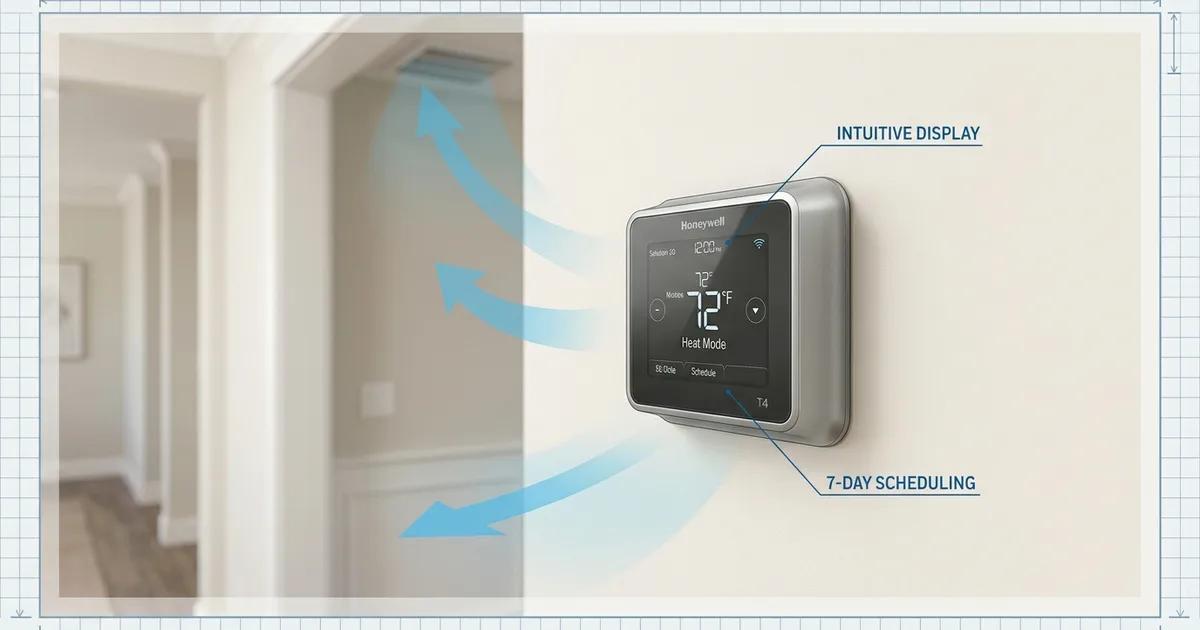
Picking a new thermostat sounds simple until you're staring at a wall of options at the supply house — or scrolling through a dozen model numbers on a distributor website. The Honeywell Home T-Series alone includes the T4 Pro, T6 Pro, T9, and T10 Pro, and they look similar in photos but work very differently.
This guide cuts through that confusion. We'll cover what the Honeywell T4 thermostat actually is and does, who it makes sense for, and how it compares with the smarter options in the same lineup. We'll also look at what Sacramento homeowners on SMUD's time-of-use rate should know before buying any thermostat.
Key Takeaways
- The Honeywell T4 Pro is a programmable thermostat — it follows a set schedule but has no Wi-Fi, no app, and no remote access (Resideo, 2026)
- No C wire required — the T4 Pro runs on two AA batteries, which matters in older Sacramento homes with 2-wire systems
- ENERGY STAR certifies smart thermostats save roughly 8% of heating and cooling costs (~$50/year) — that figure applies to Wi-Fi models, not the T4 Pro (ENERGY STAR/EPA)
- SMUD's summer peak rate hits $0.3765/kWh (5–8 p.m. weekdays) — more than 2.4x the off-peak rate — which makes scheduling accuracy important (SMUD, 2026)
- SMUD offers a $50 instant rebate on qualifying smart thermostats through the SMUD Energy Store — the T4 Pro does not qualify because it has no Wi-Fi
What Is the Honeywell T4 Pro Thermostat?
The Honeywell T4 Pro is an entry-level programmable thermostat made by Resideo — the company that took over Honeywell's home comfort products. It sits at the bottom of the T-Series lineup, positioned below the Wi-Fi-connected T6 Pro. The T4 Pro is sold through HVAC contractors and distributors rather than consumer retail, which is part of why it doesn't show up as often in home improvement store ads.
The T4 Pro uses push-button controls and a backlit display. You program your heating and cooling schedule using buttons on the unit itself — there is no smartphone app, no remote access, and no internet connection involved. If that sounds limiting, that's intentional: plenty of homeowners want a reliable schedule without the complexity of app setup and Wi-Fi pairing.
What it supports:
- Conventional systems: 1 heat / 1 cool (model TH4110U2005)
- Heat pumps with auxiliary heat: up to 2 heat / 1 cool (model TH4210U2002)
- Four programming modes: 7-day, 5-2, 5-1-1, or non-programmable
- Adaptive Intelligent Recovery, which learns how long your system takes to reach the set temperature and starts it early so the house is comfortable on time
What it does not support:
- Multi-stage conventional systems (a 2-stage gas furnace requires the T6 Pro or higher)
- Wi-Fi, app control, or voice assistants
- SMUD demand-response programs
Street price runs roughly $40–$90 depending on the distributor, with a 5-year warranty when installed by a licensed professional.
Does the Honeywell T4 Pro Need a C Wire?
No — and for many Sacramento homeowners in older homes, that's the most important sentence in this guide. The T4 Pro runs entirely on two AA alkaline batteries, so no C wire is required.
A C wire (short for "common wire") supplies continuous 24 VAC power from your HVAC system's control board to the thermostat. Older homes — many in Sacramento's Midtown, Curtis Park, and Arden neighborhoods — were wired with only two to four thermostat wires. That's enough for the T4 Pro. A smart thermostat with Wi-Fi is a different story.
According to Honeywell Home's own support documentation, "C-Wires are required on all Resideo WiFi thermostats." The reason is straightforward: always-on Wi-Fi, app connectivity, and backlit displays draw continuous power that battery-based trickle current can't reliably sustain. Without a C wire, some thermostats attempt "power stealing" — borrowing current from the heating or cooling circuit — which can cause relay chatter or short cycling.
If you do have a C wire, you can connect it to the T4 Pro's C terminal. The display will stay lit for 45 seconds after you make changes, versus 8 seconds on battery power only. It's a minor convenience, not a requirement.
Your options if a future upgrade to Wi-Fi is on the table:
- Check whether a spare wire already exists in the bundle at your thermostat — many homes have a fifth wire capped off and unused
- Install a C-wire adapter (Honeywell's THP9045A1023 Wire Saver Module) at the furnace, which repurposes the G fan wire
- Have an HVAC technician run a new wire — the cleanest long-term solution for 2-wire systems
The T4 Pro's Universal Wall Plate is shared across the entire T-Series, which means upgrading to a T6 Pro later requires no patching or repainting — you swap just the thermostat face.
How Much Can a Thermostat Actually Save You?
The honest answer: it depends on which thermostat you're talking about. ENERGY STAR tracks real-world energy savings from certified smart thermostats and reports average savings of approximately 8% of heating and cooling costs, or about $50 per year (ENERGY STAR, EPA). That figure covers Wi-Fi-connected, ENERGY STAR-certified models like the T6 Pro and T9, not basic programmable thermostats like the T4 Pro.
The T4 Pro can still save money — any thermostat that reduces unnecessary heating and cooling saves money — but savings depend entirely on how well you set the schedule. A smart thermostat with geofencing adjusts automatically when you leave unexpectedly; the T4 Pro runs whatever schedule you programmed, whether you're home or not.
For Sacramento homeowners on SMUD's Time-of-Day rate, the stakes are higher. In 2026, SMUD's summer peak rate during the 5–8 p.m. window sits at $0.3765 per kWh on weekdays. Off-peak runs $0.1550 per kWh. That's more than a 2.4x difference. Running your AC hard during peak hours is expensive; pre-cooling your home to 72°F before 5 p.m. and letting it drift to 78°F during the peak window cuts the bill noticeably.
A T4 Pro can be manually scheduled to raise the setpoint at 4:45 p.m. and drop it again at 8:15 p.m. That works as long as your schedule is consistent. The T6 Pro or T9 can do this automatically and adapt if you come home two hours early, which is where the real-world advantage of a smart thermostat shows up for Sacramento homeowners.
Honeywell T-Series Comparison: T4 Pro vs T6 Pro vs T9
The table below compares the four main models in the Honeywell Home T-Series as of mid-2026. Note that the T9 and T10 Pro are discontinued on Honeywell's own site, though distributor inventory still exists.
| Feature | T4 Pro | T6 Pro (Wi-Fi) | T9 | T10 Pro |
|---|---|---|---|---|
| Wi-Fi / App control | No | Yes | Yes | Yes |
| C-wire required | No (battery) | Yes | Adapter included | Adapter sold separately |
| ENERGY STAR certified | No | Yes | Yes | Yes |
| Smart room sensors | No | No | Yes (up to 20) | Yes (RedLINK) |
| Geofencing | No | Yes | Yes | Yes |
| IAQ control | No | No | No | Yes |
| Multi-stage support | 2H/1C heat pump only | 3H/2C heat pump; 2H/2C conventional | 3H/2C heat pump | 3H/2C heat pump |
| Smart home integrations | None | Alexa, Google, Apple Home | Alexa, Google, Apple Home | Alexa, Google, Apple Home |
| SMUD demand-response eligible | No | Yes | Yes | Yes |
| SMUD $50 rebate eligible | No | Yes | Yes | Yes |
| Programming modes | 7-day, 5-2, 5-1-1, non-prog | 7-day, 5-2, 5-1-1, non-prog | 7-day | 7-day, 5-1-1, 5-2 |
| Warranty (pro install) | 5 years | 5 years | 1–2 years | 5 years |
| Approx. street price | $40–$90 | $95–$130 | ~$160 (via SMUD) | $200–$280 |
| Current availability | Available via distributors | Available | Discontinued (Honeywell site) | Discontinued (Honeywell site) |
Sources: Resideo Pro T4 Pro, Resideo Pro T6 Pro, Honeywell Home T9 vs T10 Pro, 2026.
The pattern is clear: each step up adds connectivity and intelligence but also adds installation requirements. The T4 Pro is the right call for homeowners who want simplicity and don't have — or don't want to add — a C wire. The T6 Pro is the sweet spot for most Sacramento homeowners who want smart features and SMUD rebate eligibility. The T9 and T10 Pro made sense for homes that needed room-by-room sensors, but both are now discontinued on Honeywell's direct channels.
Does the T4 Pro Make Sense for SMUD Customers?
The short answer is: it depends on how predictable your daily schedule is. For SMUD customers on the Time-of-Day rate, every model in the T-Series can help you avoid the expensive 5–8 p.m. peak window — but they do it differently.
In 2026, SMUD's summer peak rate hits $0.3765/kWh during weekdays from 5 to 8 p.m. The off-peak rate is $0.1550/kWh. If your household runs on a consistent schedule — home by 8 p.m. every weekday, away all day — a T4 Pro set to pre-cool before 5 p.m. does the job at a low cost.
If your schedule varies, or if you want to participate in SMUD's demand-response programs (where SMUD can temporarily adjust your thermostat during high-grid-load events in exchange for bill credits), you need a Wi-Fi thermostat. The T4 Pro cannot connect to SMUD's network.
The SMUD $50 instant rebate is also off the table for the T4 Pro. It requires a Wi-Fi-enabled smart thermostat purchased through the SMUD Energy Store. For homeowners replacing a thermostat anyway, the rebate nearly closes the price gap between the T4 Pro and T6 Pro — making the T6 Pro the stronger financial case for most SMUD customers.
Our technicians at A-CLASS see this regularly: a homeowner buys a T4 Pro because it's affordable and simple, then realizes six months later they want remote access. The Universal Wall Plate means the upgrade to a T6 Pro is a 10-minute swap — but it's worth thinking through upfront so you're not paying for installation twice.
Who Should Buy the Honeywell T4 Pro?
Not every home needs a smart thermostat. The T4 Pro is the right fit in specific situations:
Buy the T4 Pro if:
- Your home runs on 2 or 3 thermostat wires and you'd rather not deal with a C-wire adapter
- You want a simple, reliable schedule with no app setup, no Wi-Fi pairing, and no ongoing subscription
- You're replacing a failed thermostat quickly and a pro-installed, straightforward unit is the priority
- Your HVAC system is a basic single-stage conventional or single-zone heat pump — the T4 Pro handles both cleanly
Choose the T6 Pro (Wi-Fi) instead if:
- You're on SMUD's Time-of-Day rate and want the $50 rebate to offset the cost
- You want to control the thermostat remotely when you're away from home
- Your furnace has a C wire — or you're willing to add one during installation
- You have a 2-stage furnace or a multi-stage heat pump (up to 3H/2C)
- Voice control via Alexa or Google Home matters to you
Consider the T9 or T10 Pro (check availability) if:
- You want room-by-room temperature sensors to balance a home that heats unevenly
- IAQ control — humidifier, dehumidifier, or ventilation — is a priority (T10 Pro only)
- You have a dual-fuel system (T10 Pro only)
Both the T9 and T10 Pro are currently listed as discontinued on Honeywell's direct channels. If you're interested in room sensors, ask your HVAC contractor about current availability and any successor models Resideo may have released.
Thermostat Installation in Sacramento: What to Expect
Installing a T4 Pro is one of the simpler HVAC tasks. Battery-powered, no C wire, and the UWP wall plate snaps in cleanly. Still, there are a few things Sacramento homeowners should know before scheduling the job.
Check your wire count first. If you eventually want to upgrade to a Wi-Fi thermostat, knowing whether you have a spare wire in the bundle is worth a quick look now. A technician can identify this during any thermostat visit.
System compatibility matters more than the thermostat. The T4 Pro won't support a 2-stage gas furnace. If your system was installed in the last 10 years, there's a reasonable chance it's multi-stage — worth confirming before you buy the T4 Pro. The T6 Pro covers multi-stage at a modest price difference.
Placement affects accuracy. A thermostat in a hallway near a sunny window or directly above a supply register will give inaccurate readings. If your existing thermostat location has always felt off — the house is 3 degrees warmer than what the thermostat shows — relocation during installation fixes that permanently.
For a detailed look at what thermostat installation involves, including wire identification, system compatibility, and what professional installation costs in the Sacramento area, visit our thermostat installation service page.
Frequently Asked Questions
Is the Honeywell T4 a smart thermostat?
No. The Honeywell T4 Pro is a programmable thermostat, not a smart thermostat. It has no Wi-Fi, no app, and no remote access. You set a schedule manually using its push-button controls, and it follows that schedule. If you want remote control or geofencing, the T6 Pro Wi-Fi is the next step up in the Honeywell Home T-Series lineup.
Does the Honeywell T4 Pro need a C wire?
No. The T4 Pro runs on two AA alkaline batteries, so no C wire is required. That makes it one of the easiest thermostats to install in older Sacramento homes that only have two or four thermostat wires. You can add a C wire for a brighter display, but it is entirely optional.
How much can a smart thermostat save on my energy bills?
ENERGY STAR reports that certified smart thermostats save an average of about 8% of heating and cooling costs, or roughly $50 per year. The T4 Pro is not ENERGY STAR certified and is not a smart thermostat, so those savings figures apply to Wi-Fi connected models like the T6 Pro or T9, not the T4 Pro.
What is the difference between the Honeywell T4 and T6 Pro?
The T6 Pro adds Wi-Fi connectivity, app control, geofencing, Alexa and Google Home integration, and ENERGY STAR certification. It also supports multi-stage systems up to three heat and two cool. The T4 Pro has none of those features but costs less, needs no C wire, and has a simpler learning curve. Both use the same Universal Wall Plate, so upgrading later requires no patching.
Does SMUD offer a rebate on the Honeywell T4 Pro?
No. SMUD's $50 instant thermostat rebate requires a Wi-Fi-enabled smart thermostat purchased through the SMUD Energy Store online. The T4 Pro has no Wi-Fi, so it doesn't qualify. If the rebate is important to you, the T6 Pro Wi-Fi is the closest model in the Honeywell lineup that does qualify.
Can the T4 Pro control a 2-stage furnace?
No. The TH4110U supports single-stage conventional systems (1 heat, 1 cool). The TH4210U adds a second heat stage but only for heat pumps with auxiliary heat. For a 2-stage gas furnace, you need the T6 Pro or higher.
A-CLASS Heating and Air has installed thermostats in Sacramento homes since 2016 — from basic two-wire swaps to full smart-home integrations. If you're not sure which model fits your system, call us at (916) 342-9108 and we'll give you a straight answer before you buy anything. No upsell, no pressure — just a clear recommendation based on your wiring, your system, and your schedule.
Ready to schedule? Visit our thermostat installation page for details on what we cover and how to book a visit.
Sources:
- ENERGY STAR / EPA, "Smart Thermostat FAQ," retrieved 2026-06-21, https://www.energystar.gov/products/smart_thermostats
- Resideo, "T4 Pro Programmable Thermostat (TH4110U2005/U)," retrieved 2026-06-21, https://www.resideo.com/us/en/pro/products/air/thermostats/programmable/t4-pro-programmable-thermostat-1-heat-1-cool-th4110u2005-u/
- Honeywell Home, "T4 Pro Programmable Thermostat," retrieved 2026-06-21, https://www.honeywellhome.com/products/t4-pro-programmable-thermostat
- Honeywell Home, "Everything You Need to Know About a C Wire," retrieved 2026-06-21, https://www.honeywellhome.com/blogs/support/everything-you-need-to-know-about-a-c-wire
- Resideo, "T6 Pro Smart Thermostat (TH6320WF2003/U)," retrieved 2026-06-21, https://www.resideo.com/us/en/pro/products/air/thermostats/wifi-thermostats/t6-pro-smart-thermostat-multi-stage-3-heat-2-cool-th6320wf2003-u/
- Honeywell Home, "What's the Difference Between the T9 and T10 Pro?," retrieved 2026-06-21, https://www.honeywellhome.com/blogs/support/whats-the-difference-between-the-t9-smart-thermostat-and-the-t10-pro-smart-thermostat
- SMUD, "Time-of-Day 5–8pm Rate Details," retrieved 2026-06-21, https://www.smud.org/Rate-Information/Residential-rates/Time-of-Day-5-8pm-Rate/Rate-details
- SMUD, "Rebates for My Home," retrieved 2026-06-21, https://www.smud.org/Rebates-and-Savings-Tips/Rebates-for-My-Home
Frequently Asked Questions
Is the Honeywell T4 a smart thermostat?
No. The Honeywell T4 Pro is a programmable thermostat, not a smart thermostat. It has no Wi-Fi, no app, and no remote access. You set a schedule manually using its push-button controls, and it follows that schedule. If you want remote control or geofencing, the T6 Pro Wi-Fi is the next step up in the Honeywell Home T-Series lineup.
Does the Honeywell T4 Pro need a C wire?
No. The T4 Pro runs on two AA alkaline batteries, so no C wire is required. That makes it one of the easiest thermostats to install in older Sacramento homes that only have two or four thermostat wires. You can add a C wire for a brighter display, but it is entirely optional.
How much can a smart thermostat save on my energy bills?
ENERGY STAR estimates that certified smart thermostats save an average of about 8 percent of heating and cooling costs, or roughly $50 per year. The T4 Pro is not ENERGY STAR certified and is not a smart thermostat, so those savings figures apply to Wi-Fi connected models like the T6 Pro or T9, not the T4 Pro.
What is the difference between the Honeywell T4 and T6 Pro?
The T6 Pro adds Wi-Fi connectivity, app control, geofencing, Alexa and Google Home integration, and ENERGY STAR certification. It also supports multi-stage systems up to three heat and two cool. The T4 Pro has none of those features but costs less, needs no C wire, and has a simpler learning curve. Both use the same Universal Wall Plate, so upgrading later requires no patching.